
Install the plugin
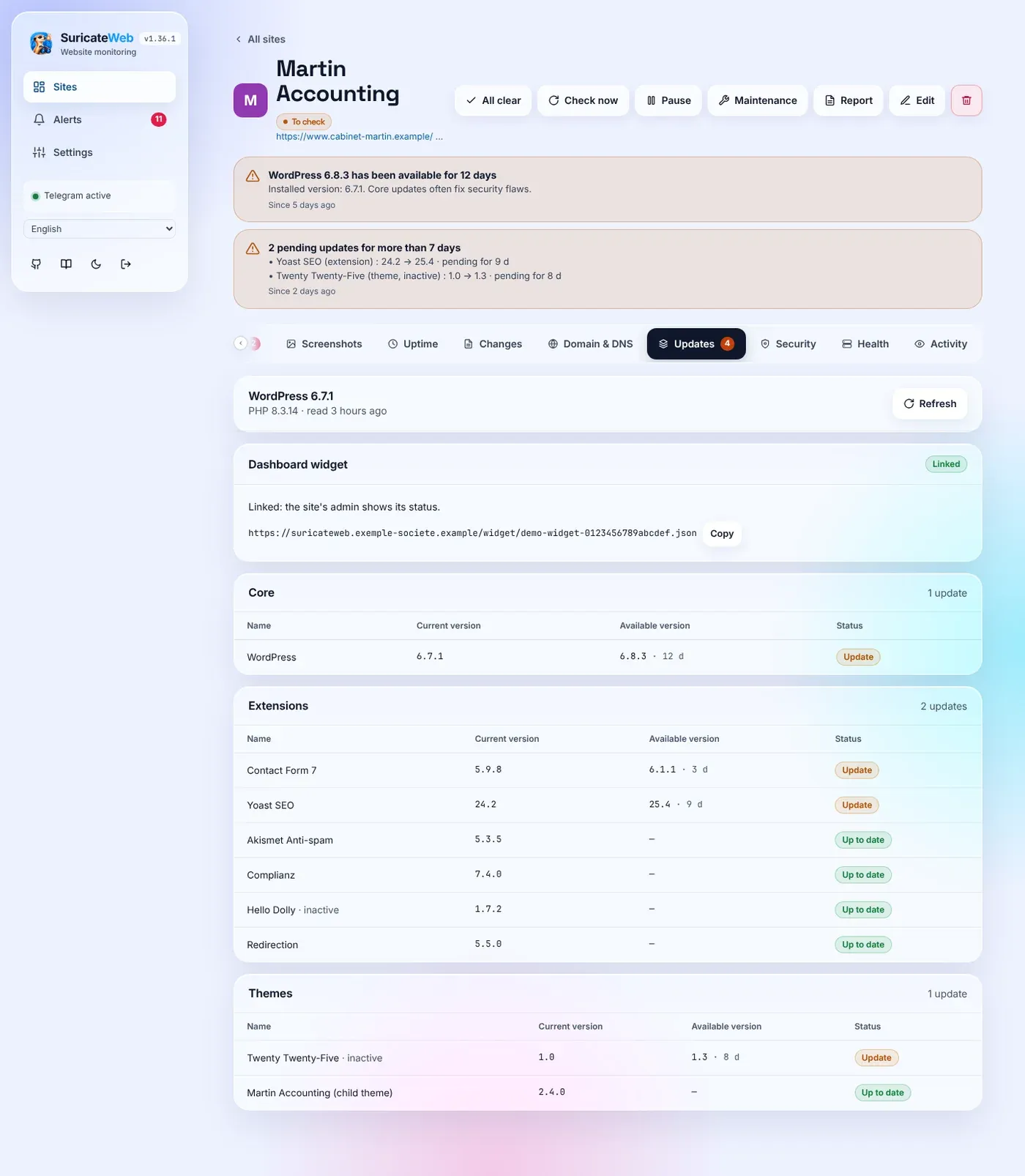
A small plugin, installed on your site, lets SuricateWeb read what an outside check cannot see: the PHP version, updates to the core, plugins and themes, file integrity, administrator accounts and server health. The plugin sends nothing by itself: SuricateWeb comes to read it, with a token.
Installation
Section titled “Installation”- In SuricateWeb, open the site (Edit), WordPress / PrestaShop section: choose the CMS. A token is generated.
- Download the plugin from the same section (WordPress: a
.ziparchive; PrestaShop: a module.zip). - Install it like any extension, then activate it.
- Paste the token into the plugin’s settings:
- WordPress: Tools › SuricateWeb › Settings
- PrestaShop: Modules › Module Manager › SuricateWeb › Configure
- In SuricateWeb, open the site, Updates tab, then click Refresh.
Monitored updates
Section titled “Monitored updates”The Updates tab shows the core, the plugins (or modules) and the themes, with the installed version and the available version. An alert goes out when an update is late: 7 days by default (adjustable), critical for the core after 30 days. The end of PHP support is also reported.
What travels
Section titled “What travels”- The plugin only returns: the PHP and CMS versions, and for each plugin, module or theme its name, identifier, version, the available version and its state. It also returns the number of administrators, file paths (never their content) for integrity and suspicious code, and server facts for health. No email, no password, no content, no customer data.
- Without a valid token (compared in constant time), the plugin answers “unauthorized” and returns nothing.
- That list remains sensitive: it tells an attacker which flaws to try. Keep the token secret and monitor a site over HTTPS.
Which version for which feature
Section titled “Which version for which feature”| Feature | WordPress | PrestaShop |
|---|---|---|
| Updates and PHP version | 1.0 | 1.0 |
| Administrator accounts | 1.1 | 1.1 |
| File integrity | 1.1 (official checksums) | partial |
| Suspicious code | 1.3 | 1.3 |
| Dashboard widget | 1.4 | 1.4 |
| Server health | 1.5 | 1.5 |
| Hardening | 1.6 | no |
| Plugin page (Site data) | 1.8 | 1.6 |
| Activity log | 1.7 | no |
An older plugin keeps providing what it knows how to do; the tab concerned then says “plugin too old” and offers the update. Replace the plugin with the new archive: the token is kept.