
Telegram alerts
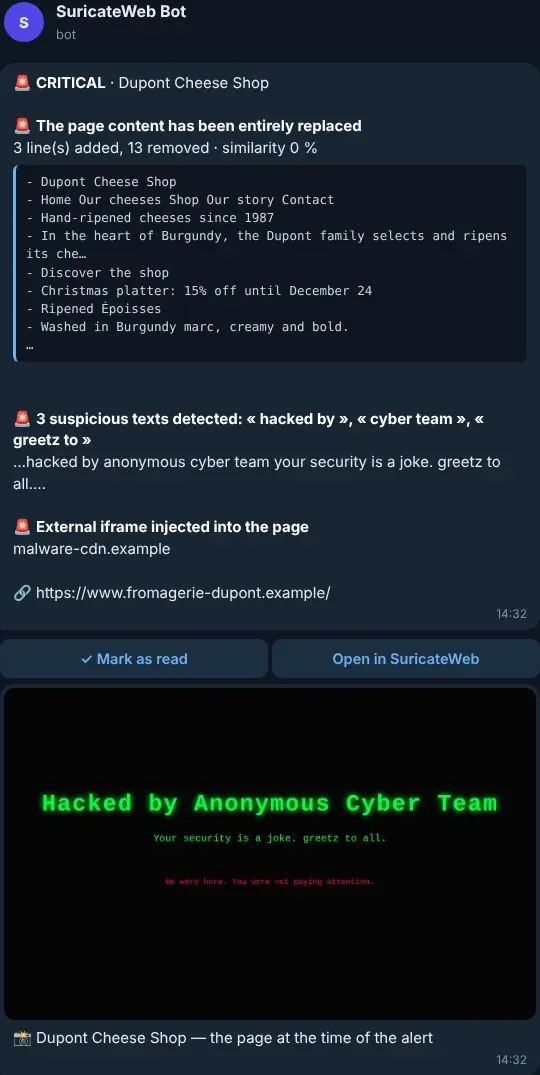
One message is sent per check, even when several anomalies are detected. It contains the severity, the site, the detail and an extract of the changed lines. For a critical alert that is visible on the page (content replaced, script or iframe injected, redirect), it is followed by a photo of the page at the time of the alert.
- In Telegram, open @BotFather, send
/newbotand copy the token you are given. - In SuricateWeb, Settings › Telegram notifications: paste the token, then send
/startto your new bot (or add it to a group). - Click Detect: SuricateWeb finds your conversation ID by itself.
- Click Test, then Save.
Once saved, the token is only sent back to the browser in abbreviated form.
Options
Section titled “Options”| Option | Effect |
|---|---|
| Notifications on | Turns off all sending without losing the configuration |
| Recovery | “✅ Recovered” message when an incident goes away |
| Extract of the changes | The first lines added or removed, in the message |
| Screenshot attached | A photo of the page for visible critical alerts |
| Minimum level | “Warning and critical” by default; “Critical only” for less noise |
| Buttons | “Mark as read” and “Open in SuricateWeb” under each message |
Buttons under alerts
Section titled “Buttons under alerts”- ✓ Mark as read marks the site’s alerts as read, up to the last one in this message, without opening the application. SuricateWeb receives the click by polling Telegram: no public address to open, it works locally too.
- Open in SuricateWeb requires SuricateWeb’s public address (Settings) to be reachable from a phone. Telegram refuses
localhostand private networks: the button is then left out and the link stays in the text. - Only the configured conversation may act. If the bot is in a group, all its members can click: that is a Telegram limitation.